
Location Score Element: Integration
This is a guide to the technical integration of a Location Score Element onto a website/ domain. It is assumed that the Location Score Element is already created and styled. To create and style a Location Score Element using the Location Score Element Wizard, follow the guide: http://support.avuxi.com/support/style-your-location-score-element
Getting Started
Make a note of the Project ID and the Location Score Element ID. These 2 codes will be needed for the next steps.
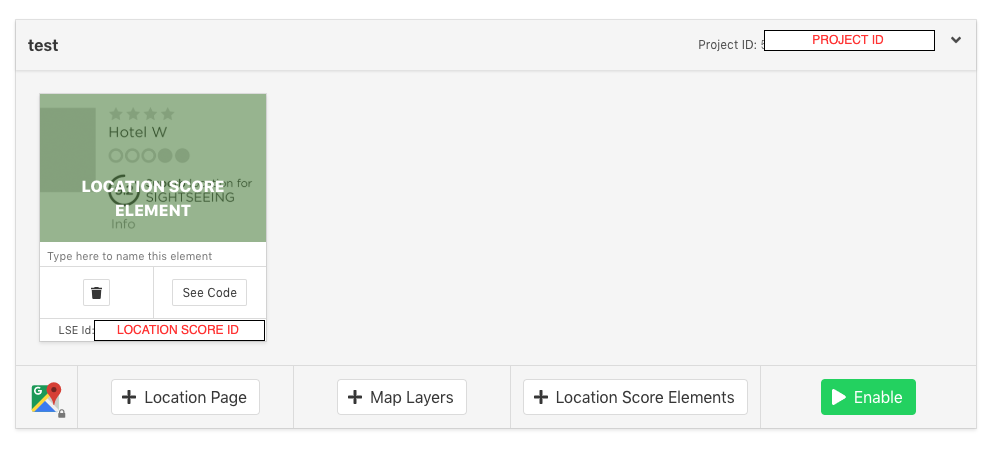
Click on “See Code” to reveal the integration code.
NOTE: This code can be saved in an html file to see a working demo of the Location Score Element.
Step 1 – Add the Script to Your Page.
The script has all the JS, CSS and SVG need to render the Location Page. We need to add this script to the page.
The script is "https://m.avuxicdn.com/v3/s/[AVUXI_PROJECT_ID]/en".
note the "en" suffix to specify the english version.
Please change the LN in https://m.avuxicdn.com/v3/s/[AVUXI_PROJECT_ID]/LN with the language code of the page.
We also highly recommend loading the script asynchrously using "sc.async". See below for example:
<script type='text/javascript'>
var sc = document.createElement('script');
sc.id = 'vxscript';
sc.type = 'text/javascript';
sc.async = 'async';
sc.src = 'https://m.avuxicdn.com/v3/s/[AVUXI_PROJECT_ID]/en';
document.body.appendChild(sc);
</script>
Step 2 – Add the Location Score Element
Add a span html tag into the part of the page where you want the element to appear. Below is an example of a Span element:
<span class="vxwic" t="[LOCATION SCORE ID]" ll="41.390847,2.16902"</span>
- "t" is equal to the Location Score ID it is the number we noted earlier after the creation of Location Score Element.
- "ll" is equal to the latitude and longitude of the location where you wish the Location Score Element to reference.
Options
Control the script once it is fully loaded
You can use the callback function.
- Add the callback function in you page "function avapil(){....}",
- Add the name of the function in the url "https://m.avuxicdn.com/v3/s/[AVUXI_PROJECT_ID]/en?callback=avapil"
- ready
Execute action after loading the Location Score Element
Using the callback function, after the script is loaded, you can override function "AVAPI.LSEEnd = function(data){ .... }"
This function is executed when the Location Script Data is loaded.
Example:
<script type='text/javascript'>
var sc = document.createElement('script');
sc.id = 'vxscript';
sc.type = 'text/javascript';
sc.async = 'async';
sc.src = 'https://m.avuxicdn.com/v3/s/[AVUXI_PROJECT_ID]/en?callback=avapil';
document.body.appendChild(sc);
function avapil() {
    AVUXI.LSEEnd = function (data) {
        console.log(data);
    }
}
</script>